
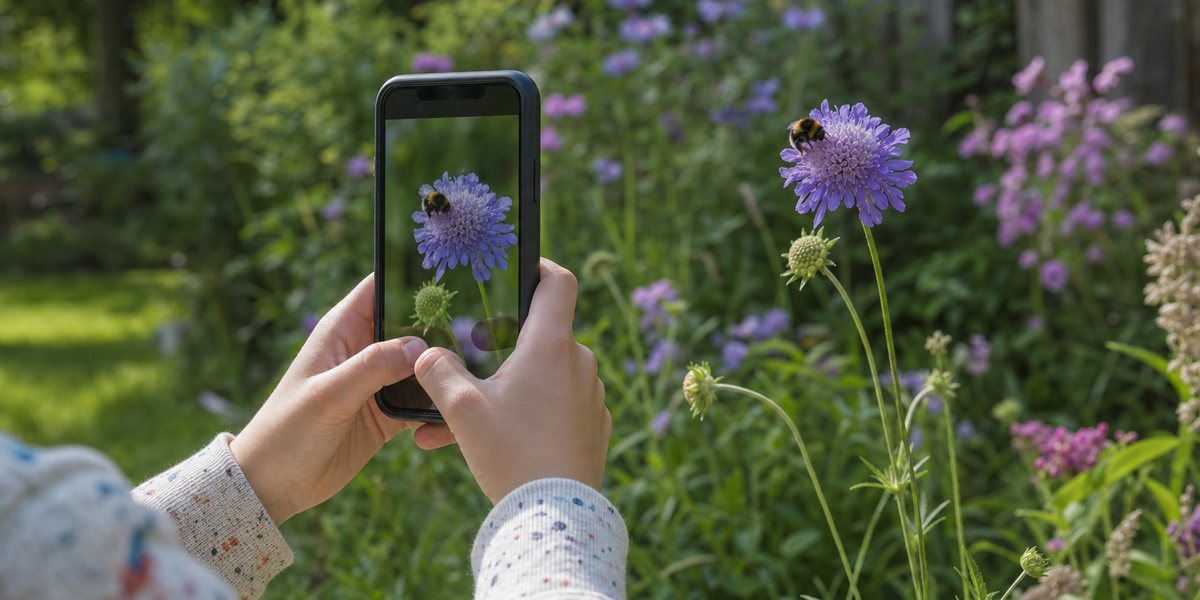
Most apps that promise to identify any animal from a photo do one of two things instead: they identify one narrow group of animals extremely well, or they identify everything badly. The best bird app in the world cannot tell you what beetle is on your windowsill, and the app that recognises the beetle will shrug at your dog’s breed. Knowing which kind you are holding is the whole game.
We compared ten animal identification apps on the four things that decide whether the answer is any use: what they can actually identify, whether a human ever checks the result, whether they work with no signal, and whether “free” stays free. Our top pick is WunderWild. The best free options are Merlin Bird ID for birds and Seek by iNaturalist for everything else.
Table of Contents
- The short answer
- Animal identification apps compared
- 1. WunderWild, best overall
- 2. Seek by iNaturalist, best free app
- 3. iNaturalist, best for a verified answer
- 4. Merlin Bird ID, best for birds
- 5. Google Lens, the one already on your phone
- 6. Picture Insect, best for bugs and spiders
- 7. Dog Scanner and Cat Scanner, for breeds not species
- 8. ObsIdentify, excellent in Europe only
- 9. The paid bird apps we would skip
- Which app for what you’re photographing
- Four things that decide whether you can trust an ID
- Why your identification came back wrong
- Watch the trial dates
- Frequently asked questions
The short answer
- Best overall: WunderWild. The only app here that answers “what animal is this” at species, subspecies and breed level across every animal group, and flags the ones that bite.
- Best free app: Seek by iNaturalist. Runs entirely on your phone, so it works with no signal, and covers plants and fungi too.
- Best for birds: Merlin Bird ID. Free, from Cornell, and it identifies birds by sound, which is a bigger accuracy jump than any camera upgrade.
- Best when you need to be sure: iNaturalist. A real human community confirms the identification, which no AI-only app can offer.
- Best for insects: Picture Insect.
- Best for pet breeds: Dog Scanner and Cat Scanner. Breed identification is a different job from species identification, and the wildlife apps are bad at it.
Animal identification apps compared
Almost every roundup of these apps compares star ratings and price. Neither predicts whether you will get a usable answer. These four columns do.
| App | What it identifies | Human check? | Works offline? | Ads | Price |
|---|---|---|---|---|---|
| WunderWild | All animals, to subspecies and breed | No | No | None | Free trial, then subscription |
| Seek by iNaturalist | Animals, plants, fungi | No | Yes, on device | None | Free, no paid tier |
| iNaturalist | Animals, plants, fungi | Yes, community verified | Partly, uploads queue | None | Free, no paid tier |
| Merlin Bird ID | Birds only, photo and sound | No | Yes, including Sound ID | None | Free, no paid tier |
| Google Lens | Anything, but no species depth | No | No | None | Free |
| Picture Insect | Insects and spiders | Paid expert answer | Not stated | Upgrade prompts | Free trial, then $39.99/yr on iOS |
| Dog Scanner / Cat Scanner | Dog and cat breeds only | No | Premium only | Yes | Free with ads, $13.99 premium |
| ObsIdentify | Wildlife in Europe only | No | Not stated | None | Free, no paid tier |
| Picture Bird | Birds only, photo and sound | Paid expert answer | Not stated | Yes, on free tier | Free trial, then $39.99/yr |
| Smart Bird ID | Birds only, photo and sound | No | Not stated | None | Free tier, then $49.99/yr |
One thing worth knowing before you subscribe to anything: Picture Insect’s annual plan is listed at $39.99 on the App Store and $29.99 on Google Play. Check the price on your own phone rather than the one quoted in an article, including this one.
1. WunderWild, best overall
Disclosure: WunderWild is our own app. We built it, so weigh our enthusiasm accordingly. Every other app on this list is judged against the same four criteria, and where a free app beats WunderWild we say so plainly, because there are places where it does.
WunderWild is in its final pre-launch build for iOS and Android. You cannot download it from the stores yet, and the notification list is at wunderwild.app.
It exists because of the gap at the top of this article. The apps in this category that are genuinely accurate are accurate about one group of animals: Merlin knows birds, Picture Insect knows insects. The apps that cover everything either refuse to commit, like Seek, which will happily stop at “crow family” rather than name the species, or match your photo against the general web, like Google Lens, which has no idea what a field mark is.
WunderWild takes the opposite position. Point it at any animal, wild or domestic, and it returns a species name, the scientific name, the subspecies or breed where one applies, and a confidence figure. Then it gives you the part most identification apps skip: habitat, diet, lifespan, the regions the animal actually lives in, a rarity score, and a plain-language entry about what makes the animal odd. An identification with no context tells you a word. This tells you what you were looking at.
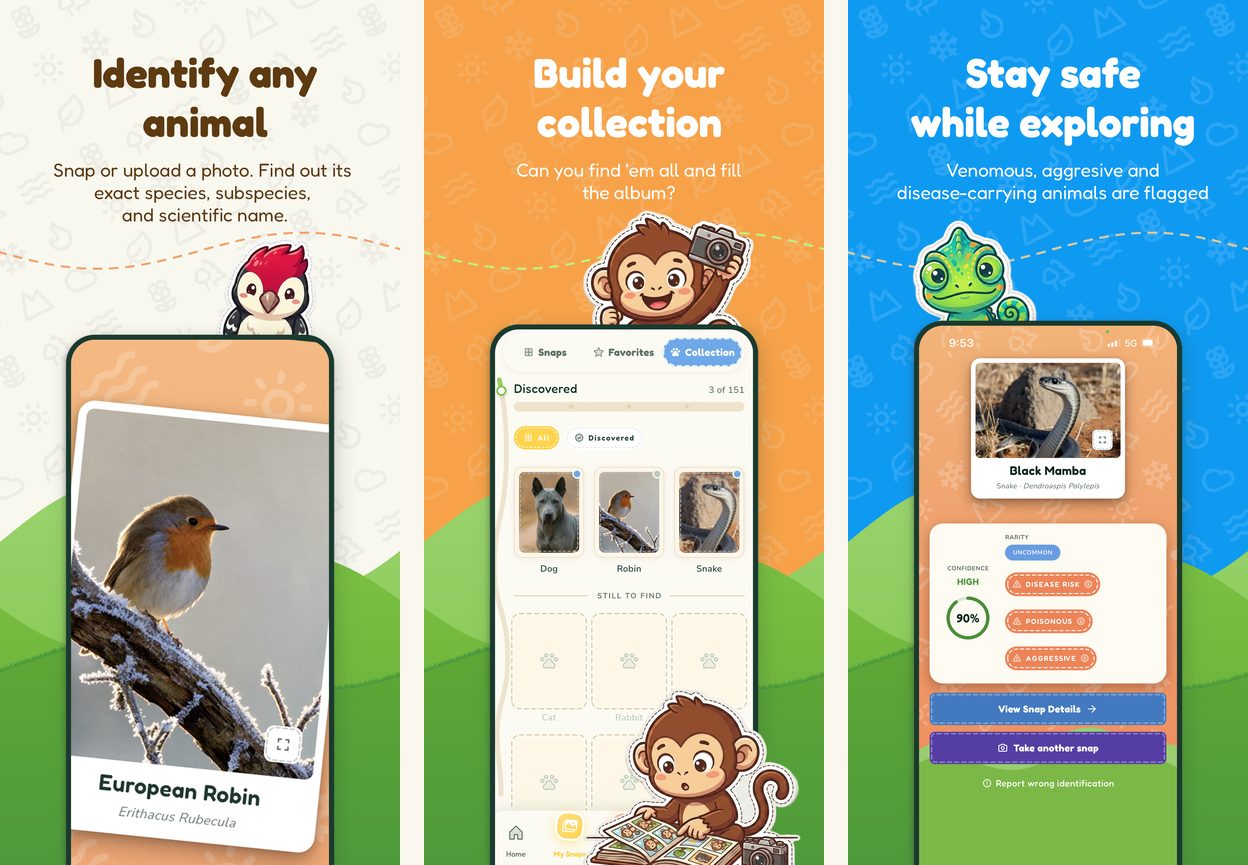
Two features have no equivalent anywhere else on this list. The first is the safety layer: venomous, aggressive and disease-carrying species are flagged on the result screen. It is context rather than expert advice, and nobody should make a real safety decision from a phone screen, but knowing that the snake in the photo is a black mamba before you step closer is worth more than a Latin name. The second is the Collection, a 151-slot roster that starts as question marks and fills with your own photographs as you find each animal. It is the reason children keep using it after the novelty of the camera wears off, and the reason a walk around the block turns into a search.
There is no advertising in it, at launch or later.
Where it loses. WunderWild does animals only, so Seek is the better app if you also want the plant the animal was sitting on. It needs an internet connection, so Merlin and Seek both beat it on a trail with no signal. It has no sound identification, which makes Merlin better for birds you can hear but not see. There is no community verification step, so iNaturalist remains the place to take an identification that has to be right. And it sits behind a subscription after a free trial, with no permanently free tier, which is a real cost next to four genuinely free apps on this list.
- Best for: anyone who wants one app for every animal, and families who want the collecting to carry the habit
- Platforms: iOS and Android, launching soon
- Price: free trial, then a subscription. No ads
2. Seek by iNaturalist, best free app
Seek is the app to install if you only install one free one. It is made by iNaturalist, a non-profit backed by the California Academy of Sciences and the National Geographic Society, and it is free with no subscription, no advertising and no account required.
Its real advantage is architectural. Seek runs its recognition model on your phone rather than on a server, so identification happens live in the camera view and does not need an internet connection at all. On a ridge with no bars, Seek and Merlin are the only two apps here that still work. It covers plants and fungi alongside animals, which matters more than it sounds, because half of what people photograph on a walk is not an animal.
The trade-off is deliberate. Seek is conservative and will name a genus or a family rather than guess a species, which gives it a low error rate and a frustrating habit of telling you that the bird is a bird. That is the correct engineering choice for a model that has to fit on a phone, and it is the wrong answer when you specifically want to know which sparrow.
- Best for: hiking without signal, kids, privacy, and anything that might be a plant
- Rating: 4.75 stars from over 30,000 App Store ratings
- Price: free, permanently, with no paid tier
3. iNaturalist, best for a verified answer
iNaturalist is the only app on this list where a human being confirms the identification. You upload the observation, the AI proposes a species, and a global community of naturalists and specialists agrees, corrects or refines it. Once enough of them concur, the record is marked research grade and becomes part of a dataset scientists actually use.
That makes it the right tool for the identifications that matter: a snake near the house, a spider in the bedroom, an animal you suspect is rare, anything where a confident wrong answer is worse than a slow right one. Every other app on this list gives you a machine’s opinion and no way to check it. It is also the best answer for fish, which photograph badly through water and where a reference like our Caribbean reef fish guide will often get you there faster than a camera.
Two things to know. It is slower, sometimes by days, because you are waiting on volunteers. And the apps are currently in an awkward state: the rebuilt iNaturalist app is iOS only, while Android users are still on the older codebase, now called iNaturalist Classic. If you are on Android, expect the dated version.
- Best for: identifications that have to be right, and contributing real data
- Rating: 4.58 stars from over 4,700 App Store ratings for Classic
- Price: free, permanently, funded by grants and donations
4. Merlin Bird ID, best for birds
Merlin is the most loved app in this entire category, at 4.86 stars from more than 111,000 App Store ratings, and it is free because the Cornell Lab of Ornithology is a non-profit. It identifies birds only. Install it anyway.
The reason is Sound ID. Merlin listens to your surroundings and names the birds singing in real time, several at once, and it does this with no internet connection at all. For birds this is a larger accuracy gain than any camera can deliver, because most birds are heard long before they are seen, and a photograph of a distant silhouette in a tree contains almost no information while its song is diagnostic. Download a regional bird pack and the photo identification and species accounts work offline too.
Its photo identification is backed by the Macaulay Library and eBird’s global sightings database, which means it knows what is plausible where you are standing. The only real weakness is the obvious one: it will not help with the beetle.
If you want to stop needing the app for the birds you see every week, learn the marks it is reading. Our yellow birds identification guide and birds of England guide cover exactly those.
- Best for: birds, birdsong, and anyone who walks the same route often
- Rating: 4.86 stars from over 111,000 App Store ratings, the highest here
- Price: free, permanently, with no ads and no paid tier
5. Google Lens, the one already on your phone
Lens is not an animal identification app. It is a visual search engine that matches your photo against Google’s index of web images, and it is already on your phone, which is its entire argument. For a pigeon, a grey squirrel or a labrador in good light it will give you the right answer in one tap.
Past the common cases it degrades quickly, and it degrades in exactly the situations where you need help: distant subjects, juveniles, animals in poor light, partly hidden animals, and regional species that are not well represented online. It has no trained species model behind it, no offline mode, no habitat or behaviour information, no sound identification and nobody to check the answer. Use it as the free first guess, not as the tool you rely on.
6. Picture Insect, best for bugs and spiders
Insects are the hardest group for a general model, because the differences between species are small, numerous and often microscopic. A dedicated app earns its place here. Picture Insect handles insects and spiders, holds 4.65 stars from over 44,000 App Store ratings, and adds a paid feature that lets you put an uncertain photo in front of an entomologist.
The complaint in its reviews is not accuracy, it is the funnel. The seven-day free trial converts to an annual subscription, and a steady stream of users report being charged because they forgot. Set a calendar reminder the day you install it.
Its publisher also sells a generalist sibling, Picture Nature, which claims to identify all of nature. It has a fraction of the ratings and a visible pattern of confident wrong answers on anything outside insects and birds. The specialist apps from this publisher are the good ones.
For the times you would rather look something up than photograph it, our water insects identification guide and the complete A to Z list of insects are the reference side of the same job.
7. Dog Scanner and Cat Scanner, for breeds not species
Nobody photographing their own dog wants to be told it is Canis familiaris. Breed identification is a separate problem, and the wildlife apps are uniformly bad at it because domestic animals are barely in their training data.
Siwalu’s two scanners do that job. Dog Scanner reads breeds from live video as well as stills, handles mixes, and sits at 4.63 stars from over 36,000 App Store ratings. Cat Scanner is the same engine pointed at cats, and it is inherently less useful, because most cats genuinely are domestic shorthairs and no model can invent a pedigree that is not there.
Both run advertising on the free tier, and both put offline scanning behind the paid one. That is a materially worse deal than Merlin or Seek offer, and worth knowing before you install.
8. ObsIdentify, excellent in Europe only
ObsIdentify is free, ad-free, and built by Naturalis Biodiversity Center in the Netherlands with Natuurpunt in Belgium. Within its range it is one of the most accurate apps available, precisely because its model is trained on regional observation data rather than a global average.
Its range is Europe and the Dutch Caribbean. Outside that, it is not a tool you should use. It reads like a general wildlife app and most roundups list it as one, which quietly sends readers in North America, Asia and Australia to an app that cannot serve them. If you are in Europe, put it above Seek.
9. The paid bird apps we would skip
Picture Bird and Smart Bird ID are both competent. Both do photo and sound identification, both are well rated, and Smart Bird ID deserves credit for being genuinely ad-free even on its free tier, which is rare in commercial freemium apps.
The problem is that they cost $39.99 and $49.99 a year respectively to compete with Merlin, which is free forever, has no advertising, comes from an ornithology lab, holds a higher rating from twenty times as many reviewers, and has better sound identification. There is no reader for whom that is the right trade. One structural note on Smart Bird ID: its Android release is split into separate region-locked builds, so a single Play Store rating does not describe the app you will actually download.
Which app for what you’re photographing
| What you’re looking at | Use this | Why |
|---|---|---|
| A bird you can see | Merlin | Trained on the Macaulay Library and filtered by what is actually near you |
| A bird you can only hear | Merlin Sound ID | Nothing else on this list identifies calls, and it works offline |
| An insect or spider | Picture Insect | Species differences are too fine for a general model |
| A snake or lizard | WunderWild, then iNaturalist | Get the safety flag immediately, then get it confirmed by a human |
| A mammal in the wild | WunderWild or iNaturalist | Subspecies matter, and the free generalists often stop at family |
| Your own dog or cat | Dog Scanner or Cat Scanner | Breed identification is a different model entirely |
| A fish | iNaturalist | Fish photographs are hard and the community catches the errors |
| Something that might be a plant | Seek | The only pick here that covers plants and fungi as well as animals |
| Anything, with no phone signal | Seek or Merlin | The only two that run their model on the device |
| Anything, in Europe | ObsIdentify | Regional training data beats a global model in its own region |
Four things that decide whether you can trust an ID
Whether a human ever sees it
This is the largest difference between these apps and almost nobody mentions it. Seek, Merlin, Google Lens, the Picture apps, the Scanners and WunderWild all give you a machine’s answer with no review. iNaturalist puts your observation in front of people who know the group, and only calls it settled when they agree. If a wrong answer has consequences, that distinction is the only one that matters.
Whether the model runs on your phone or on a server
An on-device model works in a canyon and a cloud model does not. On-device models are also smaller, which is why Seek is cautious about naming species. A cloud model can be far larger and give you a sharper answer, and it needs a bar of signal to give you anything at all. Neither is better. They fail in different places, which is the argument for having one of each installed.
What “free” means in five years
Merlin, Seek, iNaturalist and ObsIdentify are built by non-profits, museums and universities, funded by grants and donations. They have no commercial reason to introduce advertising or a paywall. The commercial apps here are funded by subscriptions, and their free tiers exist to sell them. That structural difference predicts how an app will behave over years far better than today’s price does. It is not an argument against paying, and it is a good reason to know which kind you are installing.
What the confidence number is telling you
Confidence figures are not comparable between apps. One app’s 90 per cent is a statement about how well your photo matched its training data. Another’s is a threshold chosen by a product team to feel reassuring. A high number never means the animal has been identified, only that the model was not conflicted. Treat every result under about 80 per cent as a starting point for a second photo.
Why your identification came back wrong
Most failed identifications are photograph problems, not app problems. These models are trained on images where the animal is the subject, and they fail in predictable ways.
- Fill the frame. A sparrow forty feet up is a photograph of a tree. Get closer or accept that you are asking the model to work from a few dozen pixels.
- Do not pinch to zoom. Digital zoom throws detail away before the model ever sees it. Shoot wide and crop the image afterwards instead.
- Motion blur beats these models faster than a bad angle does. A sharp photograph from behind is more useful than a blurred one from the front.
- Shoot the diagnostic feature. It differs by group: for birds, the head and bill in profile plus the folded wing; for insects, straight down on the back with the wings and body segments visible; for reptiles, the head scales and the pattern along the spine; for mammals, the whole body from the side with the face visible; for fish, a flat side-on view.
- Never shoot into the light. A backlit animal is a silhouette, and a silhouette has no field marks.
- Give the app your location. Regional filtering removes thousands of implausible candidates. It is the single cheapest accuracy improvement available to you.
- One animal per photograph. Two animals in a frame make the model choose which one you meant, and it often chooses wrong.
- Expect juveniles and females to fail. Training sets skew heavily towards adult males, especially for birds. A female mallard and a first-year gull are misidentified constantly, and that is a data problem you cannot photograph your way out of.
- Unusual colouring throws them for the same reason. Colour morphs and regional variants are thin in the training data, which is why pink snakes and pink insects come back with confident nonsense far more often than ordinary ones do.
Watch the trial dates
Every subscription app on this list uses a short free trial that converts automatically, and the most common complaint in their reviews is not the price but the surprise. Cancelling is straightforward if you do it in time.
- iPhone or iPad: Settings, then your name at the top, then Subscriptions. Cancel at least 24 hours before the trial ends.
- Android: the Google Play app, then your profile picture, then Payments and subscriptions.
- Cancelling immediately after you install still leaves you the full trial period. Do it the same day and you never have to remember again.
Frequently asked questions
Is there one app that identifies any animal from a photo?
WunderWild and Seek both attempt every animal group. Seek is free and often stops at genus or family rather than naming a species. WunderWild names the species, subspecies or breed and adds habitat, diet and safety information, and needs a connection to do it. The single-group apps like Merlin and Picture Insect are more accurate inside their own group than any generalist.
What is the most accurate animal identification app?
It depends on the animal, and any article that gives you one name is guessing. Merlin is the most accurate for birds. Picture Insect is the most accurate for insects. ObsIdentify is the most accurate general app inside Europe. iNaturalist is the most accurate overall in the sense that matters most, because a human confirms the result.
Is there a genuinely free animal identification app?
Four of them, with no paid tier and no advertising: Merlin Bird ID, Seek by iNaturalist, iNaturalist and ObsIdentify. All four are built by non-profits or public institutions. Google Lens is also free.
Do animal identification apps work without internet?
Seek and Merlin do, because their models run on the phone. Merlin’s Sound ID works offline with no setup, and downloading a regional bird pack takes its photo identification and species accounts offline too. Everything else on this list sends your photograph to a server and needs signal.
Can an app identify a dog or cat breed?
Dog Scanner and Cat Scanner are built for it and handle mixed breeds. WunderWild identifies breeds as part of general animal identification. The wildlife apps are poor at it, because domestic animals are thinly represented in their training data.
Can an app tell me whether an animal is dangerous?
WunderWild flags venomous, aggressive and disease-carrying species on the result screen, and it is the only app here that does. Treat it as context and nothing more. No phone should be part of a decision about approaching, touching or handling an animal, and a misidentification in that situation is dangerous in a way it never is otherwise. Reading up before you travel is the reliable version of this: our guides to dangerous animals in Tunisia and dangerous animals in Panama are built for that.
Can Google Lens identify animals?
Yes, for common species in good light at close range. It matches your photograph against web images rather than a trained species model, so it falls away on distant, juvenile, poorly lit or regionally unusual animals, and it gives you a name with no habitat, behaviour or conservation information behind it.
Which one should I install if I only install one?
Install two, because they cost nothing to try and they fail in different places. Take Merlin if you mostly notice birds, Seek if you walk where there is no signal, and put WunderWild on the phone for everything else.
An app hands you a name. Knowing where the animal lives, what it eats and what else looks almost exactly like it is the part that stays with you. Start with our animals hub, or find out how much you can already recognise in WildWhere and the daily word search.

Leave a Comment